
Frequently asked questions
Everything you need to know about iQuote. Every answer here is true of the product today.
41 questions
Getting started
4Sign up for free at i-quote.app with no credit card. Add your business name, logo and brand colour, and you can create and send your first quote or invoice within minutes. Connect Stripe when you want to accept card payments online.
No. i-quote is built for business owners, not developers. Everything is point-and-click, from creating invoices to connecting Stripe. If you would like a guided walkthrough, request one on our demo page and we will email you to arrange a time.
Creating an account takes about a minute. Adding your logo, colours and business details takes a few more. Connecting Stripe for card payments is done on Stripe's own onboarding pages and usually takes around five minutes.
Yes. On the Customers page, click "Import CSV" and upload a spreadsheet export with one customer per row. Columns such as name, company, email, phone and address are matched automatically and you can correct the matching before importing. Rows whose email already belongs to a customer are skipped. You can also add customers one at a time, or while creating a quote or invoice, and invite each one to the customer portal to view their invoices and pay.
Invoicing
10In your dashboard, click "New Invoice", pick a customer, add line items, set tax and discounts if needed, and choose a template. i-quote applies your logo, brand colour and business details automatically, and you can preview the invoice before sending it.
i-quote has 6 professionally designed templates, each with its own layout. Every template uses your logo, brand colour and contact details. You can also set default payment terms, notes and tax rates for new invoices.
A quote (or estimate) is a proposal you send before work begins, showing what you plan to charge. An invoice is the bill you send to request payment. In i-quote you can convert an accepted quote into an invoice with one click, so all line items carry over.
Yes. You can bill in USD, EUR, GBP, CAD, ILS and MXN, chosen per invoice, and amounts are formatted with the right symbol for that currency.
Recurring invoices are part of the paid plans (Starter and up). Mark an invoice as recurring and choose how often it repeats (weekly, monthly or yearly). When the next one is due, i-quote creates it and emails it to your customer automatically. If you prefer to check each one first, turn off automatic sending in Settings and new invoices are saved as drafts and you are notified.
Yes. You can add a percentage or fixed-amount discount and a tax rate to any invoice, and totals are calculated automatically. Default tax rates in Settings apply to every new invoice.
No. Add as many line items as you need to an invoice or quote. Each has a description, quantity and unit price, and the total is calculated for you.
Yes. Every invoice and quote can be downloaded as a branded PDF with one click, including your logo, business details, line items, totals and payment information.
The invoice status changes to "Viewed" and you get a notification in i-quote, so you know your customer has seen it.
Invoices are marked overdue automatically once the due date passes. i-quote emails your customer a reminder 3 days before the due date, on the due date, and 1, 7 and 14 days after it (never more than one a day, and never once the invoice is paid). You can change the schedule or turn reminders off in Settings, and send a reminder by hand at any time. If you set a late fee percentage, it is added once, after any grace period you choose, and never compounds.
Payments
7When you send an invoice, your customer receives an email with a link to view it. They open the link, review the invoice and pay by credit or debit card through Stripe. The money goes to your own connected Stripe account, and your customer gets a receipt by email.
Stripe Connect lets you accept card payments into your own Stripe account through i-quote. In Settings, click "Connect Stripe" and complete Stripe's onboarding. Once connected, your customers' payments go to your Stripe balance and then to your bank.
Stripe charges its standard card processing fee (see stripe.com/pricing for your country), and i-quote adds no platform fee of its own. Payments you record yourself, such as cash or bank transfers, carry no fee.
Only if you want to accept card payments online. You can create and send quotes and invoices without Stripe, record payments you receive in other ways, and connect Stripe later.
You can record partial payments you receive by cash, cheque or bank transfer. The invoice then shows "Partially Paid" with the remaining balance, and the online payment link charges only what is still owed.
Card payments are paid out by Stripe to your bank on your Stripe payout schedule, typically within 2 to 7 business days depending on your country. The invoice is marked paid in i-quote as soon as Stripe confirms the payment.
Yes. Card payments are processed by Stripe, which is certified PCI-DSS Level 1. Card numbers are entered on Stripe's pages and never reach or are stored on i-quote's servers.
Features
7The i-quote interface is available in 10 languages: English, Spanish, French, Hebrew, Arabic, Chinese (Simplified), German, Portuguese, Japanese and Korean, with right-to-left layouts for Hebrew and Arabic. Switch language from the menu in the header.
Yes, on plans with more than one user: up to 3 users on Pro and up to 10 on Multi-Business. Invite people by email from Settings and give each a role: Owner (full access), Admin (manage invoices, quotes and customers) or Viewer (read-only).
Reports show revenue over time, top customers, invoice status breakdowns (paid, outstanding, overdue) and payment history, updated as you create invoices and receive payments.
Yes. Your customers receive branded emails when you send a quote or invoice, a receipt when they pay, payment reminders before and after the due date, follow-ups on quotes they have not answered (3 and 7 days after sending), and new recurring invoices. You are notified in i-quote when a quote is accepted or declined, an invoice is viewed or paid, or a payment fails.
Yes. Your customers can sign in to the customer portal at i-quote.app to see all their invoices and quotes, pay outstanding invoices, review payment history and update their details.
Yes. i-quote works in any modern browser on phone, tablet or desktop, and can be installed on your home screen as an app. Invoices you create while offline are saved on the device and sync when you reconnect.
Your logo, brand colour and business name appear on your quotes, invoices, PDFs, the emails your customers receive and the pages where they view and pay. Emails are sent in your business's name and replies go to your own address. On the Free plan these pages also show a small "Powered by i-quote" badge; paid plans remove it.
Pricing & plans
7Yes. The Free plan has no time limit and needs no credit card. It includes 3 invoices and 3 quotes per month, 1 user, your branding on documents, online card payments, the customer portal and PDF downloads. Customer-facing pages show a small "Powered by i-quote" badge.
There is no time-limited trial. Instead, the Free plan is free for as long as you use it, so you can try the whole workflow before paying. When you upgrade, your paid plan starts and is billed from that day.
When you reach your plan's monthly limit (3 invoices and 3 quotes on Free, 25 of each on Starter), you are asked to upgrade before creating another. Existing invoices keep working, and your customers can still view and pay them.
Invoice and quote counts reset at the start of each calendar month (UTC).
Yes. Upgrade from Settings > Billing. Once you are subscribed, upgrades, downgrades, card changes and cancellation are handled in the Stripe billing portal (also opened from Settings > Billing). Plan changes take effect immediately and Stripe prorates the difference on your next invoice.
Not at the moment. All plans are billed monthly.
Subscriptions are paid through Stripe with any major credit or debit card, including Visa, Mastercard and American Express. Plans are billed monthly in advance.
Security & data
6All traffic to i-quote is encrypted with TLS. Your data is stored in a managed Postgres database (Supabase) that is encrypted at rest, with row-level security isolating each business's data. Passwords are hashed by our authentication provider and never stored in plain text. Card payments are handled by Stripe, which is PCI-DSS Level 1 certified.
No. Row-level security in the database restricts every query to the businesses you are a member of, so no other business can read or change your customers, invoices, quotes or payments.
Cancelling your subscription moves you to the Free plan and keeps your data. To close your account and delete its data, email privacy@i-quote.app. We delete it within 30 days, except records we are required by law to keep, such as payment records.
No. We never sell your personal or business data. We share it only with the service providers needed to run i-quote (Stripe for payments, Resend for email, Supabase for the database, Netlify for hosting). Read our Privacy Policy for details.
We follow GDPR principles, including data minimisation, purpose limitation and your rights to access, correct, export and delete your data. To make a request, email privacy@i-quote.app and we will respond within 30 days.
Not natively yet. If you sign in with Google, your Google account's two-step verification protects your i-quote login.
How your client accepts, pays, or pays on the spot
Real iQuote screens with sample data. Payments go straight to your own Stripe account; iQuote adds no fee per invoice.
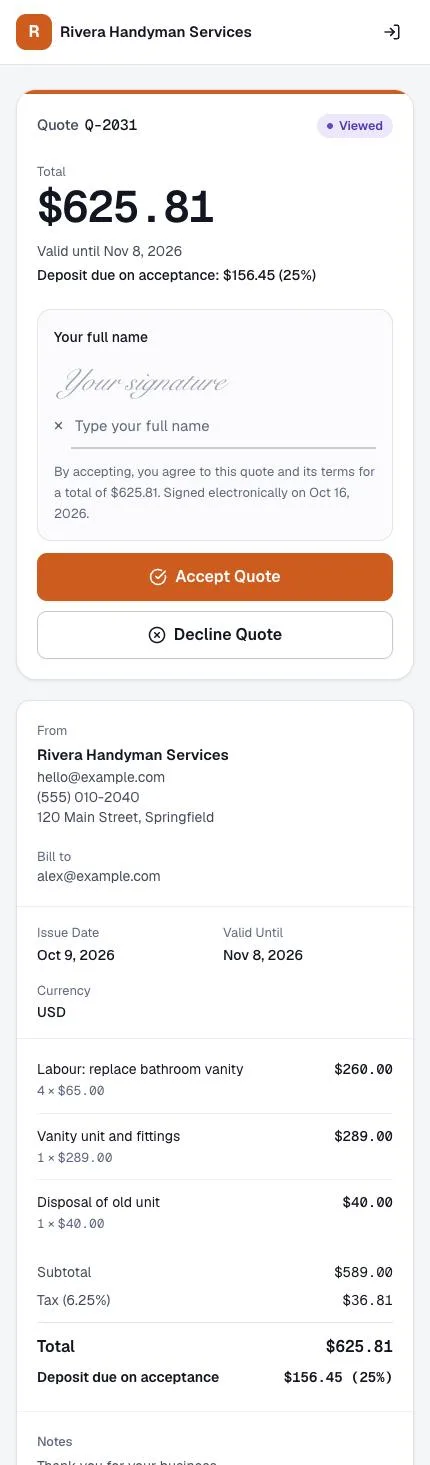
1. Accept the quote
Your client opens the quote on their phone, types their name and taps Accept. A deposit can be due on acceptance.
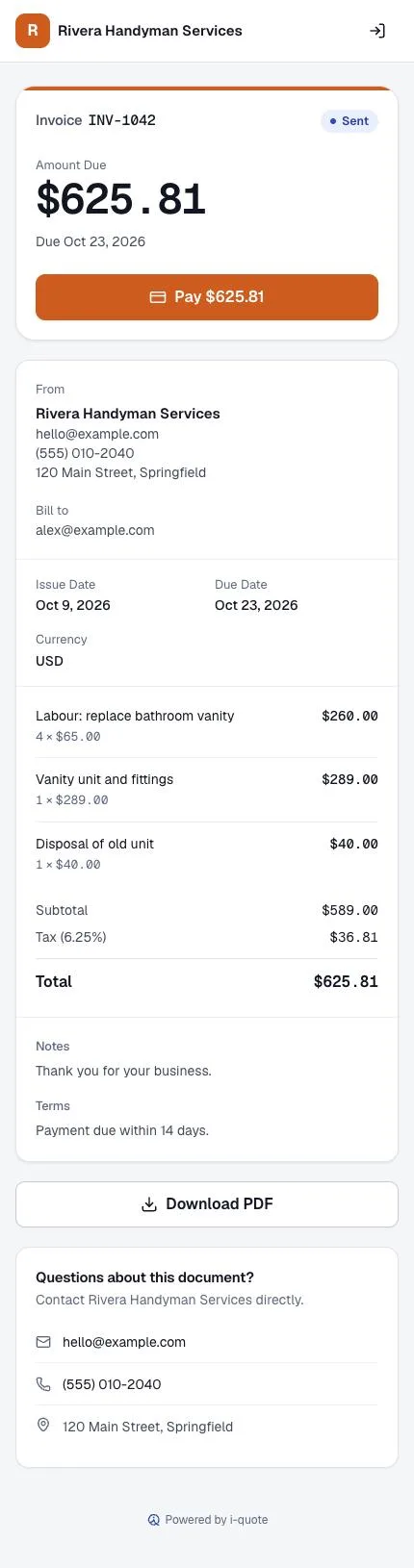
2. Pay the invoice
The accepted quote becomes an invoice with a Pay button. Card payments go to your own Stripe account.
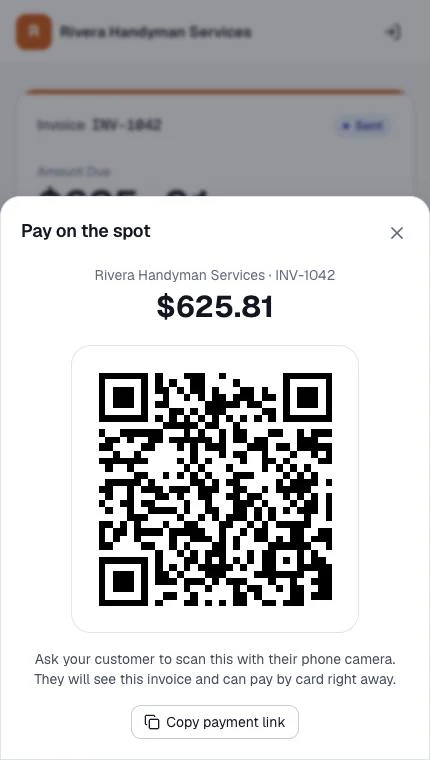
3. Or pay on the spot
Standing in front of the client? Show the QR code; they scan it with their camera and pay by card.
Still have questions?
Email us and a person replies, or request a free walkthrough. support@i-quote.app